How to WhatsApp Newsletter — This is how companies start their own WhatsApp marketing campaign [August 2024]
02.08.2024
Arrange a non-binding consultation now
In a non-binding conversation, we'll show you how to use messenger communication in compliance with GDPR, automate processes and achieve measurably more revenue and efficiency with WhatsApp. Clear, practical and tailored to your company.


Basics of the WhatsApp newsletter
WhatsApp newsletters are paid Mass messages via WhatsApp Messenger to send relevant and valuable information to customers. WhatsApp itself calls these messages “promotional messages.” For example, you can use your Inform the target group about new products, point out discount campaigns or remind existing customers of service intervals. The WhatsApp newsletter can therefore be used as part of the so-called”Conversational commercee”, where users can purchase products and services via chat with the company.
To prevent spam and excessive advertising on WhatsApp Business, parent company Meta has several Rules for using the WhatsApp API and Sending newsletters Defined. Among other things, there are limits on the number of messages sent and the content is also checked. Every message template for newsletters must be approved in advance by Meta. From a legal point of view, the GDPR Attention must be paid to, which requires the user's consent (opt-in) to receive the newsletter. Promotional messages can only be sent via WhatsApp API possible and GDPR-compliant. These requirements may sound complex, but they are very easy to implement with Hellomateo.
Would you like to learn more about the range of services offered by hellomateo's WhatsApp newsletter service? Or are you interested in an inbox where customer inquiries from various communication channels can be bundled centrally and processed efficiently? Just arrange a free consultation.
Why should companies create WhatsApp newsletters?
With WhatsApp campaigns, you have the potential to reach your customers where they are anyway. There are also many other reasons why you should upgrade your online marketing with WhatsApp:

The result for most companies: Higher customer lifetime value, increased sales and higher company profit, including through upselling and cross-selling. More information about the You can get the benefits of WhatsApp marketing here.
Create a WhatsApp newsletter - Here's how
Step 1: Check requirements for companies
All companies that use WhatsApp Business or the WhatsApp API interface must WhatsApp Commerce Policy Comply. According to the trade policy, the following are industries and services from the use of all WhatsApp business products precluded:
- Alcohol, tobacco products and accessories
- Drugs and medicines
- Illegal products and services
- Unsafe dietary supplements
- Weapons, Ammunition, or Explosives
- And much more
Accordingly, companies must Check in advanceWhether it's according to the Trading Policy Are entitled to use WhatsApp Business or WhatsApp Business API and whether they use the messenger Terms of use Be able to comply. Otherwise, there is a risk of blocking the WhatsApp profile.
To receive WhatsApp newsletters in accordance with GDPR And to send WhatsApp's terms of use, must in addition the WhatsApp Business API Be used.
Attention: Please do not send newsletters via the WhatsApp broadcast function. Sending marketing messages via WhatsApp Broadcast is not GDPR-compliant, just like using the standard WhatsApp Business app. The sending of marketing messages to your target group is only compatible with the data protection guidelines via the WhatsApp Business API platform. You can find all information about this in our article”Using WhatsApp Broadcast for Online Marketing? I'd rather not!”.
Step 2: Select WhatsApp API provider
Since the professional and GDPR-compliant sending of WhatsApp newsletters is only possible via the WhatsApp API interface, you must select a WhatsApp API provider if you have not already done so. Please note that Not all WhatsApp API providers Including creating, sending and analyzing WhatsApp newsletters support.
The process of a WhatsApp marketing campaign differs fundamentally depending on the provider of the WhatsApp API. However, a few general steps will not be missing from any campaign and are listed below.
Step 3: Collect opt-in from customers
Opt-In Basics for WhatsApp Newsletters
As with the e-mail newsletter, newsletters sent via WhatsApp Business also require that an opt-in from the recipients be received in advance. Sending advertising or saving personal data without subscribers' consent or through an opt-out has long been prohibited in the EU. In contrast to the opt-out, in which the data subject must actively object to the storage of data or the receipt of advertising, the recipient must actively consent when opting in. The conditions for consent are in Article 7 GDPR regulated.
Sending WhatsApp newsletters without the consent of the recipients violates both applicable law and the WhatsApp business terms of use and can therefore not only lead to a blocking of the WhatsApp account, but also result in legal consequences.
In order to comply with the WhatsApp terms of use and the GDPR at the same time, care should also be taken to clearly identify the name of the respective company and to make it clear to the person concerned that they will receive advertising messages through consent. It is also recommended to state how often the person receives the newsletter. Clear Communication creates the necessary basis of trust with the customer. And this trust should not be exploited, because recipients must be given the option to unsubscribe from the WhatsApp newsletter at any time with just a few clicks. WhatsApp Messenger includes the standard feature that recipients simply have to send a “stop” message to the company to unsubscribe from the newsletter. So if a company sends out newsletters at intervals of just a few days or doesn't offer customers any added value, the number of subscribers quickly drops to zero. In our Articles about WhatsApp marketing We have listed a lot of helpful tips about this.
Ways to collect the opt-in
There are many ways to collect the opt-in: Either a pop-up on the website, via a form to fill out, as a link on social media or as an invitation in the order confirmation sent by email. With a bit of creativity and attractive incentives, such as a discount on the first purchase after subscribing to the newsletter, you can quickly build up a large number of loyal newsletter recipients. Hellomateo is happy to assist you with this.

Step 4: Select target group and form message
First, identify your Target GroupTo ensure that your message reaches the right people and is interesting to your customers. Use existing data to divide your recipients into specific segments. This enables targeted communication and increases the relevance of your content. Then, write a clear and concise message. Use Personalizationto attract the attention of your recipients and integrate visual elements Like images and videos to make the message more appealing. Make sure that the tone and content of the message match the target group.
Once the message is formulated, you must write it just like others Submit message templates to Meta And up to 24 h Waiting for approval.
Step 5: Send out newsletters
After you've formulated the messages, sending them is the next important step. Determine the optimal Timing for shipping, based on your target audience's activity times. If your WhatsApp API provider supports them, use AutomatisierwerkzeugeTo ensure that your messages are sent on time and regularly. A regular shipping plan helps to strengthen customer loyalty and anchor your brand in the memory of recipients.
Step 6: Analyze Results
After sending your messages, it is crucial to Success Your campaign to Measure and to continuously optimize. Analyze the Open, click, response, and conversion rates Your messages to understand how well your campaign is working. Collect feedback from your recipients to rate satisfaction and Potential for improvement to identify. Adjust your strategy based on the insights you've gained to continuously improve the effectiveness of your WhatsApp newsletters.
Costs of WhatsApp newsletter marketing
WhatsApp newsletters belong to the “marketing” category of news and Costs 11.31 cents per newsletter in Germany. In addition, there are the fees that your WhatsApp API provider Requires. WhatsApp newsletters can only be sent via the WhatsApp API interface. Sending via the conventional WhatsApp business app is not possible. The total costs per newsletter are ultimately higher than for emails, but the enormously increased conversion rate makes WhatsApp newsletters worthwhile for most companies. Chats are divided into four categories:
- Service: Conversation started by a customer complete since 01.11.2024 Free of charge (previously 6.79 cents).
- Administration: Entertainment that was initiated by the company and contains important information for the customer. For example, information about orders, transactions and customer accounts. Costs in Germany: 4.56 cents
- Authentication: A conversation initiated by the company that includes verification codes to access the customer account. Costs in Germany: 4.56 cents
- marketing: Entertainment that was initiated by the company and includes promotional messages such as product announcements or discount campaigns. Costs in Germany: 11.31 cents
Since all conversations initiated by the company can only be started with a message template, the division into categories is based on this message template. Here you can find the latest prices directly from Meta.
Sending a WhatsApp newsletter with hellomateo

- Check prerequisites
It must be checked whether all requirements required to create WhatsApp campaigns have been met. This includes, of course, access to the WhatsApp Business API, i.e. a HelloMateo account (at least “Premium”) and Meta Verification. Make sure that you use the WhatsApp trading policy Comply and get on with the GDPR familiar.
- Prepare data
For a professional WhatsApp newsletter campaign, your customer data should be complete and correct, in particular the names and telephone numbers of your customers. Avoid duplicates and include data that is suitable for audience segmentation.
- Determine target group
In order to keep the unsubscription rate low and the conversion rate particularly high, your WhatsApp newsletters should definitely be adapted to the target group. Therefore, consider in advance which customer group you would like to address with the newsletter and set criteria for segmentation. Make sure that the appropriate attributes are available in your customer data.
- Collect opt-ins
No newsletters may be sent without the consent of the recipients (Article 7 GDPR). Therefore, collect an opt-in from as many customers as possible. Use various ways to do this, both online as a link (Click here for hellomateo's WhatsApp newsletter) as well as offline with a QR Code. There are dozens of ways to collect opt-ins: In emails, on your website, at the checkout, in changing rooms, at trade shows, in documents, on social media, etc. For even more subscriptions to your newsletter, you should convince your customers with discounts, vouchers, competitions or other benefits.
- Create campaign in hellomateo
Now the WhatsApp campaign can finally be created. To do this, open hellomateo in the web app, create a newsletter that is visually appealing in terms of content and appearance and have it approved by Meta as a message template (“Marketing” category). Determine to which recipients and on what occasion or time the newsletter should be sent.
- Sending a newsletter
Make sure that the campaign was created correctly one last time and make it live. Sending via WhatsApp is automatic.
- Analysis & evaluation
Some time after the start of the newsletter campaign, you should carry out the analysis and evaluation. Determine the opening, response and unsubscription rate with Hellomateo's practical tools and calculate the increase in sales achieved. Use this data and, if necessary, carry out A/B tests to continuously optimize your newsletters.
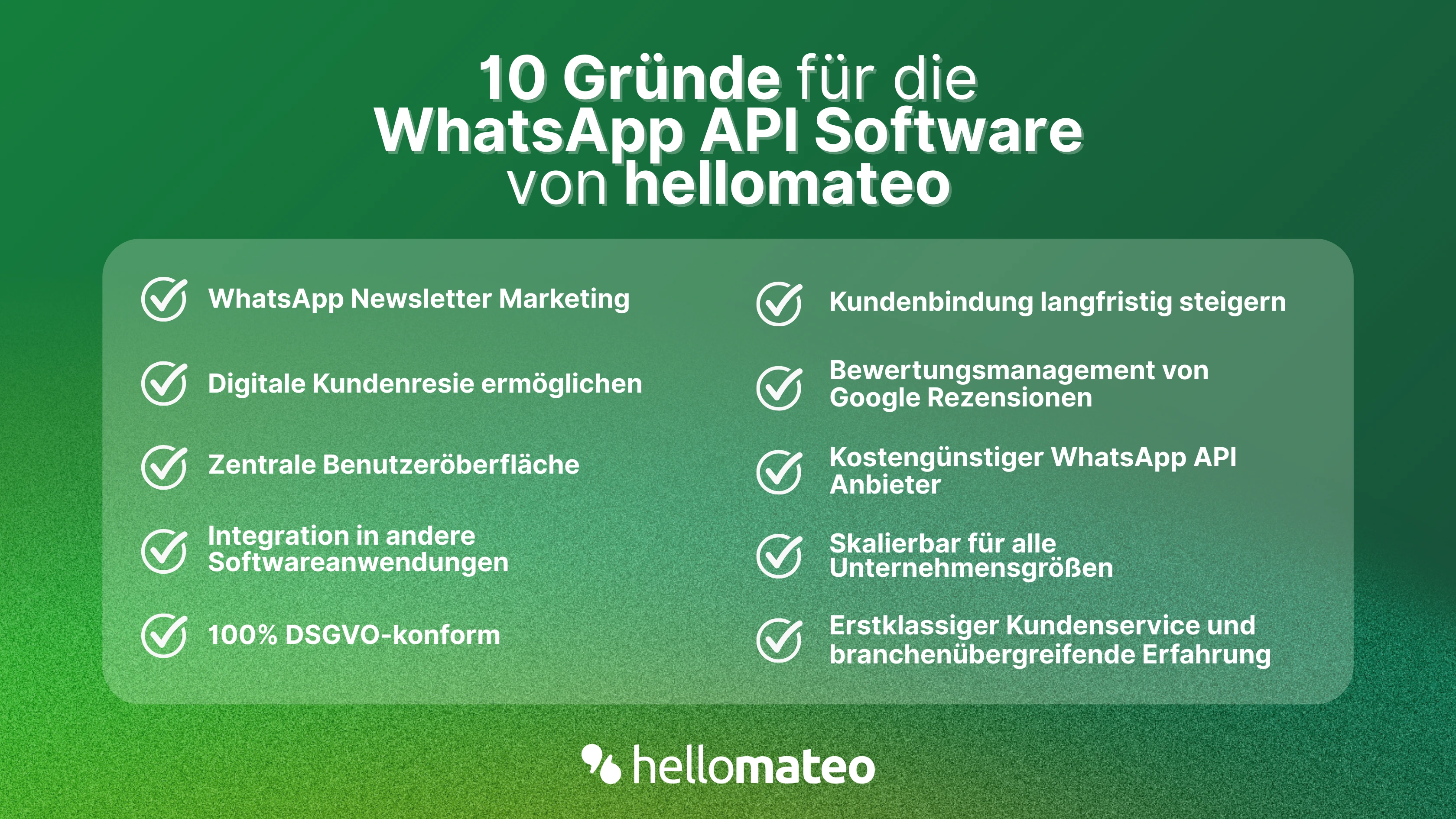
- Central user interface: hellomateo combines WhatsApp Business Platform, email, Instagram, SMS and Facebook Messenger in one central inbox. The intuitive user interface includes various tools for efficient customer communication And saves you valuable working time.
- integrations: With hellomateo, you can use WhatsApp in Integrate over 6,000 software programs and fully automated Customer trips Create with invitations, order confirmations, shipping information, invoices, and reminders.
- Newsletter marketing: Send GDPR-compliant Newsletter via WhatsApp Or SMS and benefit from opening rates of over 95%.
- Assessment management: hellomateo can Automatically request online reviews from your customers, which boosts your Google ranking and trust in your company.
- Data Protection: hellomateo meets all German and European Data protection requirements and offers end-to-end encryption for secure customer communication.
- scalability: Our software is suitable for Businesses of all sizes And can be extended indefinitely depending on the package.
- Various AI features: Our AI agent Can automatically answer customer inquiries in chat, answer calls, help with the formulation of messages and much more.
Arrange a non-binding and free consultation And we'll show you how Hellomateo covers your communication needs! Simply book an appointment here Or write to us via our web widget.
About the author
Christian Strauch
Co-Founder and CEO
Christian Strauch is CEO and co-founder of hellomateo and is responsible for the strategic and operational management of the company. In his role, he is particularly responsible for sales, marketing and partners. Under his leadership, hellomateo has developed into a central tool for customer loyalty via WhatsApp, e-mail and letter for more than 2,000 companies.
More interesting articles
WhatsApp Business Data Processing Agreement— all information for companies
WhatsApp is an integral part of customer communication for many companies. High opening rates and quick responses make the channel attractive. But as soon as you use WhatsApp Business, you process personal data — and therefore there are clear GDPR requirements. In this article, you will find out what role the order processing contract plays and why it is indispensable for companies.
![Set up WhatsApp Business Auto Reply — Quick Guide [2025]](https://cdn.prod.website-files.com/68b19e5233a4641b9e2e4f95/692dd05228900f9fa9834bd4_whatsapp-automatische-antwort.avif)
Set up WhatsApp Business Auto Reply — Quick Guide [2025]
With automatic Reply messages Is there for them in the WhatsApp Business App provides a practical way to your customers in the digital chat channel automatically greet And in a flash one first reaction to show. Because day-to-day business is often stressful; you can't always respond personally to incoming messages and write back to the customer immediately.
But there are also many other reasons why it makes sense to use automatic reply messages when using the WhatsApp Business app. With this Quick guide Automatic answers are set up in a flash!

![Grüner Haken in WhatsApp – So bekommen Unternehmen die Verifizierung [Oktober 2025]](https://cdn.prod.website-files.com/68b19e5233a4641b9e2e4f95/692dcf56fb67605603b34297_gruener-haken.avif)
Grüner Haken in WhatsApp – So bekommen Unternehmen die Verifizierung [Oktober 2025]
WhatsApp hat eine neue Funktion eingeführt: Unternehmen können Ihr Konto verifizieren lassen und bei erfolgreicher Legitimation einen grünen Haken in dem WhatsApp Business Unternehmensprofil erhalten. Das sorgt für mehr Vertrauen bei Kaufinteressenten Ihres Unternehmens und steigert Ihre Umsätze! Zudem können Sie sich durch einen grünen Haken in WhatsApp Business von Ihren Wettbewerbern abheben. Doch wie funktioniert die Beantragung des beliebten Symbols? In diesem Beitrag zeigen wir es Ihnen!