WhatsApp Cloud API: All information for companies [July 2024]
11.07.2024
Arrange a non-binding consultation now
In a non-binding conversation, we'll show you how to use messenger communication in compliance with GDPR, automate processes and achieve measurably more revenue and efficiency with WhatsApp. Clear, practical and tailored to your company.

Summary for the impatient
Die Introducing the WhatsApp Cloud API enables companies to communicate with customers seamlessly and scalably. In contrast to the previous WhatsApp Business API interface, the Cloud API does not require its own servers, as it is connected to the Meta data centers is based. This change in infrastructure simplifies Although the technical requirements, the furnishings But is still highly complex. For small and medium-sized companies and for all companies without a powerful IT department Using the conventional WhatsApp API interface via paid software from a third-party provider such as hellomateo is still the most efficient way. In addition, with regard to GDPR Consider carefully whether on servers outside the EU stored customer data meets the legal requirements of data protection.
What is the WhatsApp Business API?
For larger companies a secure, scalable and GDPR-compliant solution In August 2018, Facebook launched the WhatsApp Business API introduced. This application programming interface (API) allows companies to receive and respond to WhatsApp messages from their customers without being satisfied with the limited features of the WhatsApp Business app.
In contrast to the WhatsApp business app, the API itself comes without a user interface off. The API connects WhatsApp to a professional messaging tool, as offered by Hellomateo, for example. undertakings integrating the WhatsApp API endpoint in the softwares An official WhatsApp business solution provider. With its in-house software, Hellomateo offers corporate customers the appropriate integration into a clear user interface and also provides a variety of useful and value-adding functions:
- Integrations: Connect WhatsApp to via 6,000 software applications, such as your CRM system
- Automated messages: Order confirmations, shipping information, evaluation requests, reminders, etc. fully automated via WhatsApp to your customers
- WhatsApp newsletter: Highly effective marketing via WhatsApp, that is only possible with the API interface
- GDPR-compliant: In contrast to the traditional WhatsApp business app, the use of the WhatsApp API for companies is GDPR-compliant
- scalability: Unlimited number of users and devices with the WhatsApp API
Introduced in 2018, this version of the WhatsApp API is also called the “WhatsApp On-Premises API” by Meta. The terms”WhatsApp Business API“and “WhatsApp On-Premises API” are therefore synonyms. But what exactly is the new WhatsApp Cloud API?
What is the WhatsApp Cloud API?
Die WhatsApp Cloud API Is a platform, which offers companies the opportunity to seamlessly interact with their customers via the popular messaging service WhatsApp. It opens the door to more efficient communication channels and opens up a wide range of options for automating processes.
The API allows companies to send, receive, and manage messages, which forms the basis for diverse use cases such as customer support, notifications, marketing campaigns, and more. By using Cloud-based infrastructure Meta (the company behind WhatsApp) eliminates the need to operate its own servers, which allows access and Using the API made easier.
How exactly is the WhatsApp Cloud API different from the WhatsApp On-Premises API?
Die WhatsApp Cloud API It is fundamentally different from the On-premises API in terms of the underlying infrastructure and deployment. While the On-premises API requiredthat companies own servers Operate, does it run Cloud API in the Meta data centers. This simplifies technical requirements and allows companies to focus on actual communication instead of having to worry about procuring and maintaining servers. The following graph clearly shows the differences in infrastructure (source: Meta Platforms).
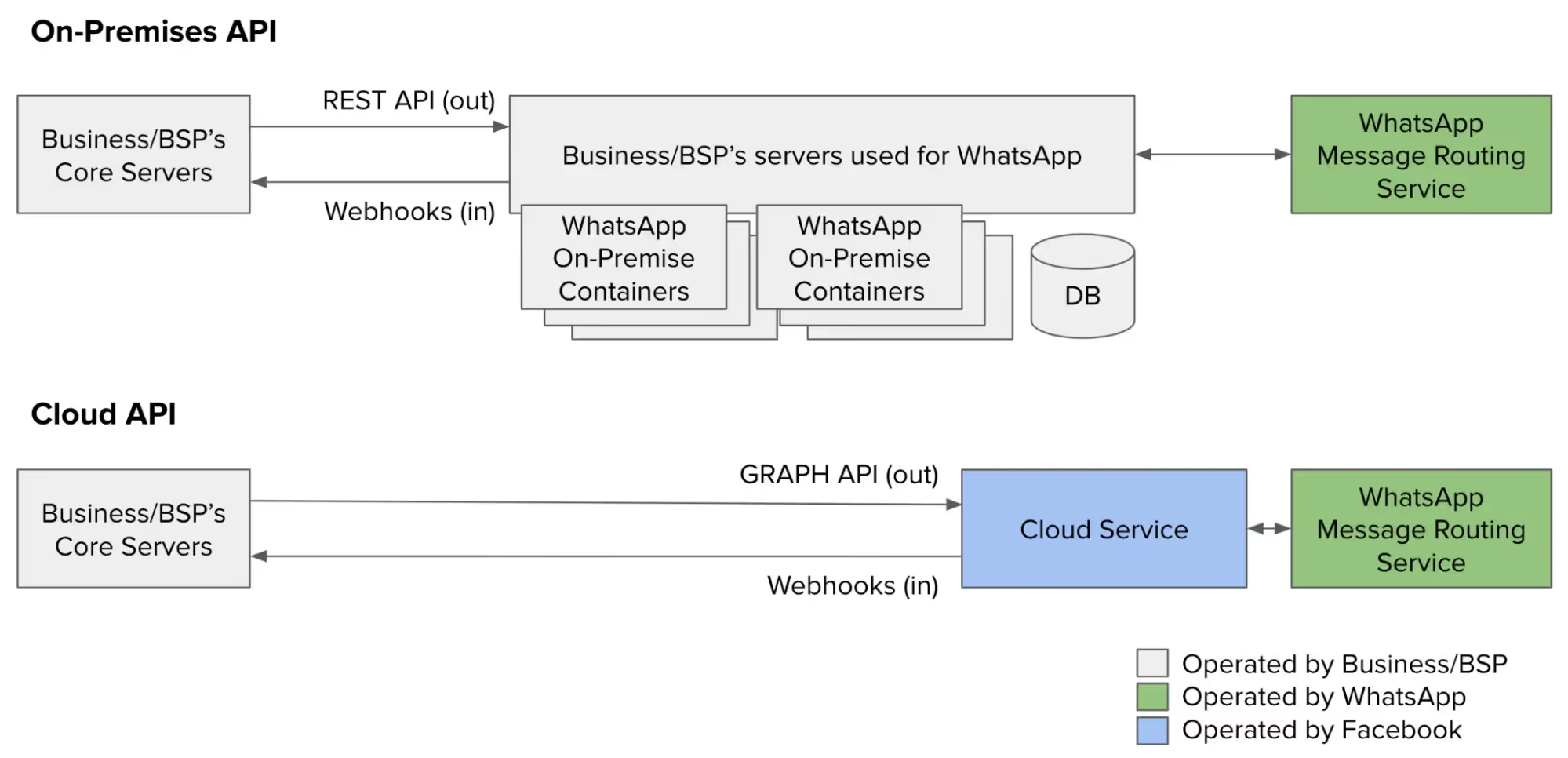
The Cloud API also offers a seamless access to new features and updates. It ensures that companies are always up to date without having to perform manual upgrades. This enables companies to respond more quickly to changing requirements and customer needs.
Reading tip: In our article “How much does the WhatsApp Business API cost in 2026?” We have described all costs in detail.
What are the key features of the WhatsApp Business API and Cloud API?
To keep WhatsApp free from excessive advertising and spam, there are some restrictions that companies must be aware of when contacting users.
To keep WhatsApp free from excessive advertising and spam, there are some restrictions that companies must consider when contacting users. Otherwise, messages via the API interface would be due to WhatsApp separate user interface completely unregulated. Since users should not be bombarded with promotional spam messages in the same way as with emails, Meta set some important rules.
Marketing with WhatsApp newsletters
Companies may promotional messages and marketing messages only as so-called”Promotional Messages“send. These are individually customizable Message templates, which must be approved in advance by WhatsApp. For example, customers can receive product suggestions based on their last order. Cold call messages and certain words or phrases that make the message sound too promotional are officially prohibited. In practice, companies have a relatively large amount of leeway when it comes to formulating their newsletter. Important customer information For example, order confirmations can of course anytime be shipped.

Consent (opt-in)
Messages can only be sent to users if they are a reply to a message from users acts or the person through a so-called Opt-In Actively agreed has received WhatsApp messages (for example, by entering a phone number and checking a box).
Service window for answers
When a user sends a request to the company via WhatsApp, the Response within 24 hours take place (“Customer Care Window”). As a result of customer inquiries therefore being answered quickly Become, does the increase user experience by WhatsApp users and contact (without opt-in) by the company is prevented.
Within the service windows does it work communications with WhatsApp Business The same How with the WhatsApp Messenger for private individuals. Messages with text, web links and emojis can be sent and, of course, images, videos and attachments such as PDF files can be shared in the chat.
Die automation In the form of chatbots, is within the service window permitted. However, the option of referring the user to a customer service representative must be available.
When that Service window closed is, users can only use a message template be contacted, not with an individual free text.
Message templates
Message templates (from WhatsApp”Template Messages“called) can customer communication for the company very efficient design. WhatsApp enterprise customers can use ready-made messages to Order confirmations, payment requests, and shipping information to ship. If your WhatsApp API provider diverse integrations provided for other software programs, this can even be done fully automatically.

Technically speaking, a message template is a string of text that wildcard (e.g. for order numbers, dates and prices) used to personalized information to provide. In addition to the standard selection of frequently used templates provided by WhatsApp Business, you can also create your own message templates to cover all service situations for the individual use case. These must be used before use approved by WhatsApp become. The approval process takes up to 24 hours. WhatsApp checks message templates to prevent companies from sending unwanted content to consumers. For message templates, there are different categories (authentication, marketing and administration) which must be strictly adhered to. More information about the categories and the respective costs can be found a little further down in the section”How much does the WhatsApp Business API cost?“.
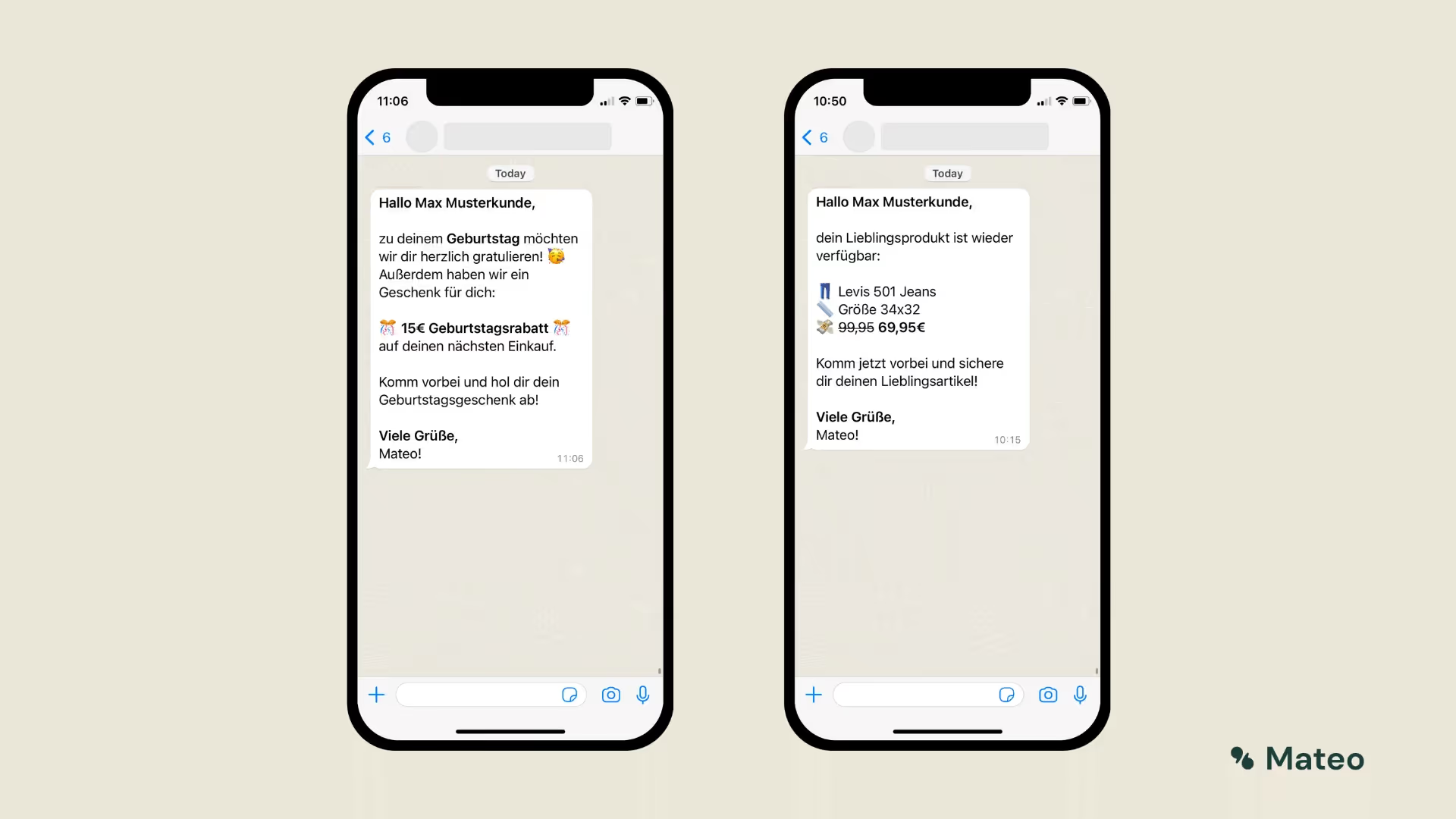
In conjunction with a clear user interface, such as those offered by hellomateo, these tools develop their full potential and make customer communication from WhatsApp Business API customers highly efficient.
How do you get access to the WhatsApp Cloud API?
Access to the WhatsApp Cloud API is either via so-called Business Solution Provider (BSPs) or directly via the WhatsApp Cloud. Business solution providers can manage the integration and deployment of the API for companies. Companies using the WhatsApp Cloud API Integrate independently want, must with a considerable commitment of personnel IT resources calculate.
If you still want to try to set up the WhatsApp Cloud API yourself, you must first create a Facebook developer account Set up your own Create an app And this with Connect WhatsApp. After successfully sending a test message, you must send a so-called Webhook configure to allow you to receive notifications. You must then set up correctly with the receipt of a test message confirm. If this was successful, you'll need your phone number connect and legitimize. A detailed and always up to date Contact Meta for instructions on how to set up the WhatsApp Cloud API. You can also find further information at META's FAQ about the cloud API.
Overall, the WhatsApp Cloud API marks a significant step in the development of corporate communications. It enables companies to to interact more efficiently and dynamically with your customers And at the same time the Minimize technical infrastructure hurdles. The Cloud API opens the door to a new era of communication, where companies can seamlessly and effectively connect with customers around the world.
However, the outlay and the required Know-how, which comes with the standalone integration of the WhatsApp Cloud API Not to be underestimated. Die WhatsApp API via an external provider How to use Hellomateo, for example, is very simple.
It's easier this way: Use the WhatsApp API with hellomateo
WhatsApp only allows very few large corporations direct access to its API. For most companies, the path to WhatsApp Business API is via so-called Business Solution Provider. These are official partners from WhatsApp owner Facebook, who help companies access the API. Setting up the API therefore depends on the API provider.
that professional messaging tool by hellomateo not only offers the integration of WhatsApp Business via the API, but also a clear user interface and the integration of many other communication channels such as email, Instagram, SMS and Facebook Messenger. Hellomateo offers a fully comprehensive service with professional customer service representatives when setting up the software including WhatsApp Business API.
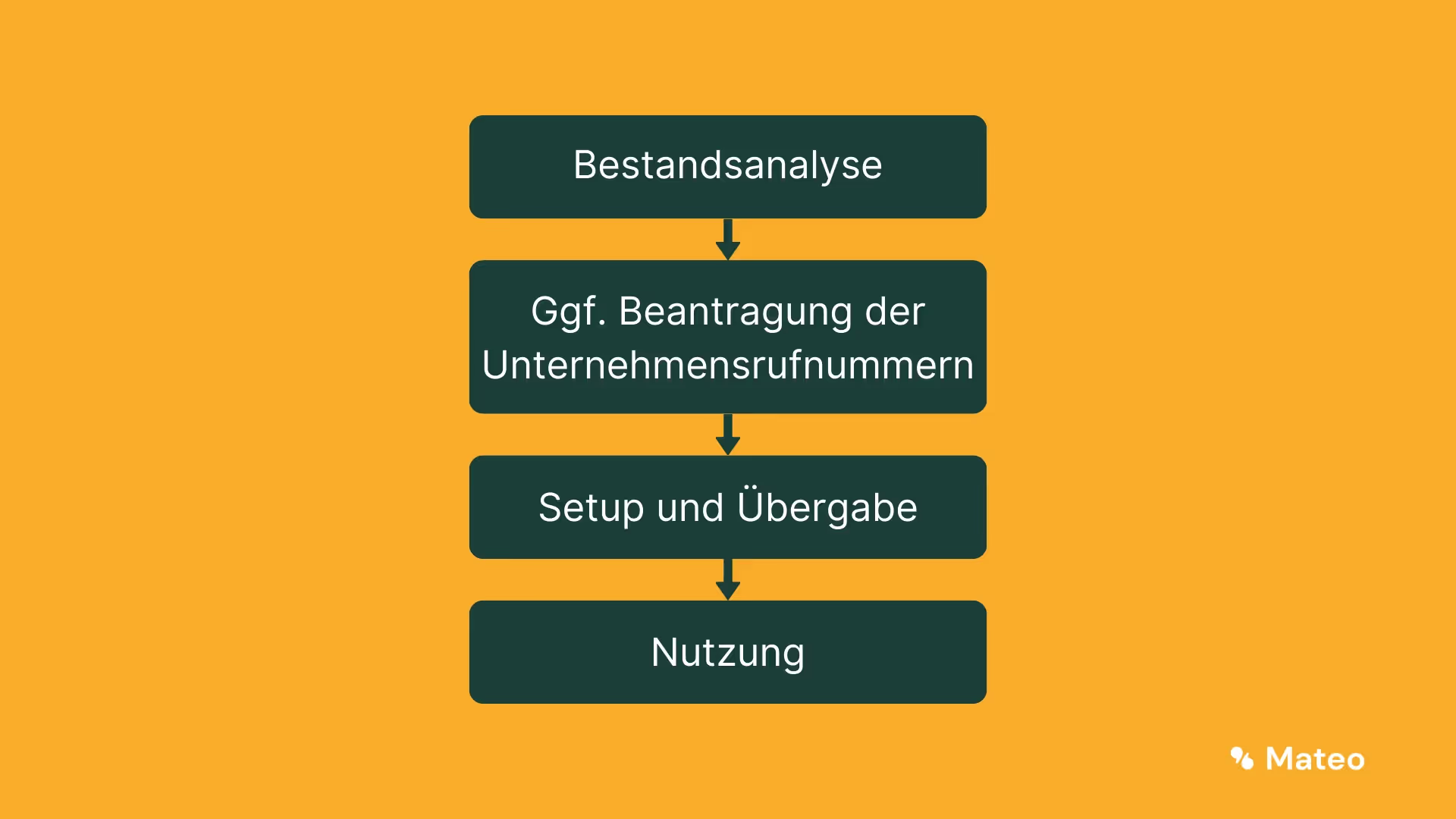
Through a Inventory analysis is identified how the software can best be integrated. If not yet available, Hellomateo will then Company phone numbers applied for and set up the system. The communication channels are now combined in the user interface provided by hellomateo and directly usable. A fixed contact person is always available to answer questions and gives further tips for highly efficient customer communication. All details are included in a free consultation discussed.
What are the benefits of the WhatsApp API in conjunction with hellomateo?
hellomateo's messaging software offers much more than a simple WhatsApp API user interface. Various features and tools mean that hellomateo's central messaging software makes customer communication significantly more efficient. Just arrange a free consultationto find out all the details Our customers Do the following know benefits particularly appreciated:
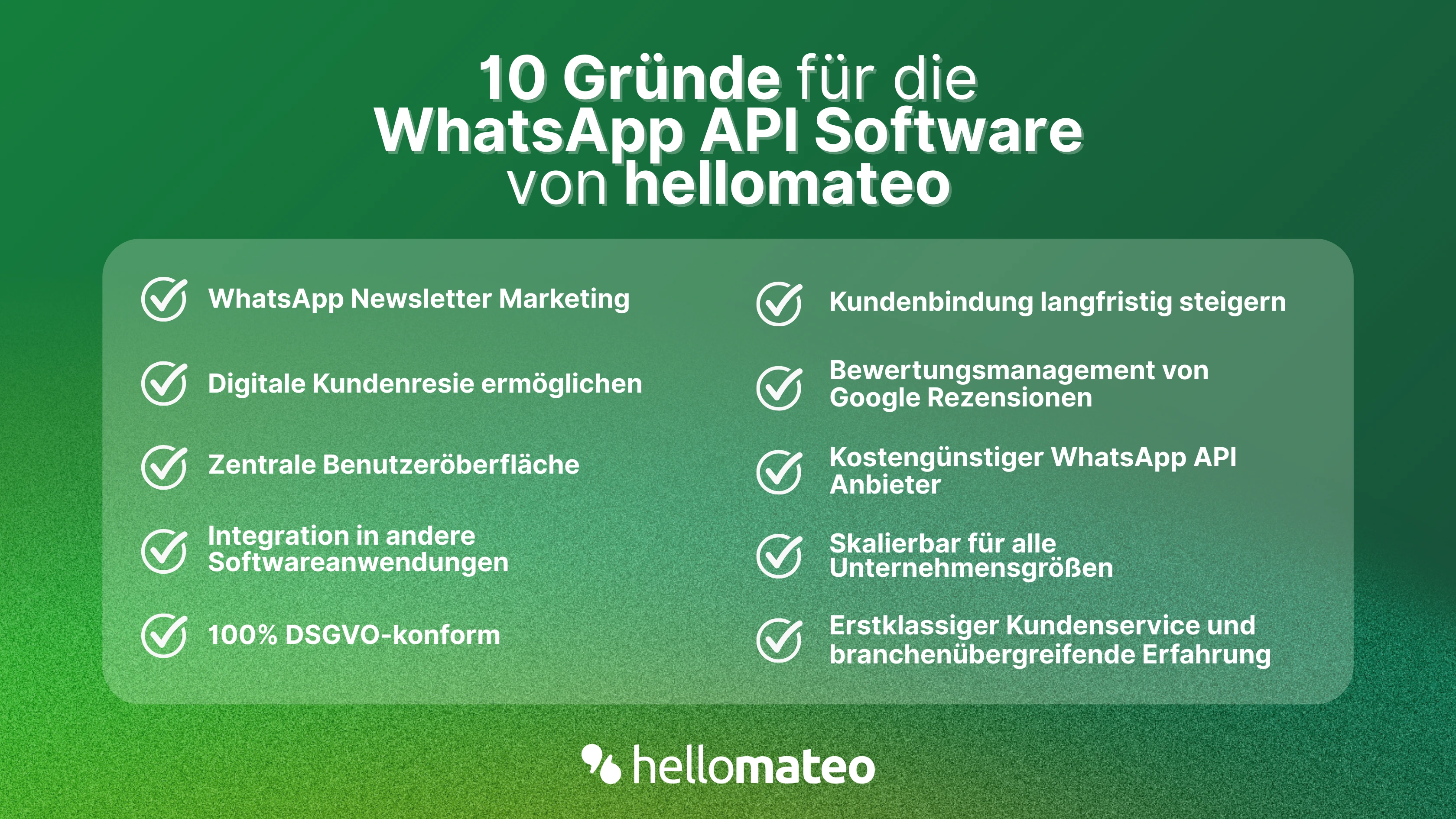
- Central user interface: hellomateo combines WhatsApp Business Platform, email, Instagram, SMS and Facebook Messenger in one central inbox. The intuitive user interface includes various tools for efficient customer communication and saves you valuable working time.
- integrations: With hellomateo, you can use WhatsApp in integrate over 6,000 software programs and fully automated Customer trips create with invitations, order confirmations, shipping information, invoices, and reminders.
- Newsletter marketing: Send GDPR-compliant Newsletter via WhatsApp or SMS and benefit from opening rates of over 95%.
- Assessment management: hellomateo can Automatically request online reviews from your customers, which boosts your Google ranking and trust in your company.
- Data protection: hellomateo meets all German and European Data protection requirements and offers end-to-end encryption for secure customer communication.
- scalability: Our software is suitable for Businesses of all sizes and can be extended indefinitely depending on the package.
- Diverse AI features: Our AI agent can automatically answer customer inquiries in chat, answer calls, help with the formulation of messages and much more.
Arrange a non-binding and free consultation and we'll show you how hellomateo covers your communication needs! Simply book an appointment here or write to us via our web widget.
About the author
Domenik Fox
CEO and Co-Founder
Domenik Fox is co-founder and CEO of hellomateo. He is responsible for Customer Success, Customer Engineering, Finance and Product. A particular focus of his work is on the continuous development of the product and the design of new features. In terms of content, he focuses primarily on automated and personalized customer communication, multichannel marketing and digital customer journeys. Together with Christian Strauch and Philipp Steinrötter, he is continuously developing hellomateo into a central platform for modern customer experience in SMEs.
More interesting articles
WhatsApp Business Data Processing Agreement— all information for companies
WhatsApp is an integral part of customer communication for many companies. High opening rates and quick responses make the channel attractive. But as soon as you use WhatsApp Business, you process personal data — and therefore there are clear GDPR requirements. In this article, you will find out what role the order processing contract plays and why it is indispensable for companies.

![Set up WhatsApp Business Auto Reply — Quick Guide [2025]](https://cdn.prod.website-files.com/68b19e5233a4641b9e2e4f95/692dd05228900f9fa9834bd4_whatsapp-automatische-antwort.avif)
Set up WhatsApp Business Auto Reply — Quick Guide [2025]
With automatic Reply messages Is there for them in the WhatsApp Business App provides a practical way to your customers in the digital chat channel automatically greet And in a flash one first reaction to show. Because day-to-day business is often stressful; you can't always respond personally to incoming messages and write back to the customer immediately.
But there are also many other reasons why it makes sense to use automatic reply messages when using the WhatsApp Business app. With this Quick guide Automatic answers are set up in a flash!

![Grüner Haken in WhatsApp – So bekommen Unternehmen die Verifizierung [Oktober 2025]](https://cdn.prod.website-files.com/68b19e5233a4641b9e2e4f95/692dcf56fb67605603b34297_gruener-haken.avif)
Grüner Haken in WhatsApp – So bekommen Unternehmen die Verifizierung [Oktober 2025]
WhatsApp hat eine neue Funktion eingeführt: Unternehmen können Ihr Konto verifizieren lassen und bei erfolgreicher Legitimation einen grünen Haken in dem WhatsApp Business Unternehmensprofil erhalten. Das sorgt für mehr Vertrauen bei Kaufinteressenten Ihres Unternehmens und steigert Ihre Umsätze! Zudem können Sie sich durch einen grünen Haken in WhatsApp Business von Ihren Wettbewerbern abheben. Doch wie funktioniert die Beantragung des beliebten Symbols? In diesem Beitrag zeigen wir es Ihnen!