WhatsApp Business Autoresponder — All Information & Instructions [August 2025]
01.08.2025
Arrange a non-binding consultation now
In a non-binding conversation, we'll show you how to use messenger communication in compliance with GDPR, automate processes and achieve measurably more revenue and efficiency with WhatsApp. Clear, practical and tailored to your company.

What is the autoresponder in WhatsApp Business?
A autoresponder into WhatsApp Business Is a predefined message, which is automatically sent to customers when certain events occur. This allows inquiries to be processed efficiently and important information to be provided directly — a real advantage for customer communication. Autoresponders can automatic or manual be used.
For automated News is suitable for general occasions, such as welcome after a first message. As soon as a customer starts the chat, an automatic response can signal that their request has been received and is being processed. This creates trust and increases customer satisfaction.
Manual quick replies work via Message templates with Text modules. All you have to do is adjust individual words — perfect for recurring inquiries.
The function is both in the WhatsApp business app as well as about the WhatsApp Business API available. Private WhatsApp accounts, on the other hand, have no access to this corporate feature.

By the way: With the WhatsApp API, you can even connect thousands of other programs to WhatsApp. They can Integrate WhatsApp into your shop system, for example and thus send automated order and shipping confirmations.
Are you currently still using a private WhatsApp account for your company? Find out why switching to the WhatsApp Business API is worthwhile here.
How to set up WhatsApp autoresponder
Create autoresponders in the WhatsApp Business app:
Autoresponders in WhatsApp Business are very easy to set up. Just follow these instructions (source: WhatsApp FAQ):
For Android
- 1.: In the WhatsApp Business app, tap”More options > Business tools > Quick answers”.
- 2.: Tap”add”.
- 3.: Tap”message” to write your message.
- 4.: Tap”abbreviation” to set the keyboard shortcut for your quick answer.
- 5.: Tap”SAVE”
For iPhone
- 1.: In the WhatsApp Business app, tap”takes”.
- 2.: Tap Business Tools > Quick answers”.
- 3.: Tap”add”.
- 4.: Tap”Enter a message” and write your message.
- 5.: Tap”abbreviation” to set the keyboard shortcut for your quick answer.
- 6.: Tap”securing”.

Note: WhatsApp web and desktop don't support media files in quick replies.
Create autoresponders using the WhatsApp Business API and hellomateo:
If you the WhatsApp Business API via hellomateo , the autoresponder is of course available as a feature. The setup process is as follows:
- 1.: Open She the hellomateo web app.
- 2nd: Click on the cogwheel top right to access settings.
- 3rd: Navigate to”news channels” and select your WhatsApp channel.
- 4th: Activate the option”autoresponder”.
- 5th: Now they can automatically Save messages.
- 6th: By clicking on”confirming” save your entries.

Use cases for autoresponders in WhatsApp Business
Welcoming customers
One of the most common uses for autoresponders is automatic greeting new chat participant — comparable to a friendly “hello” in a retail store. An immediate message shows the customer that their request has been received and will be dealt with soon.
Even with longer response times or outside business hours, this allows you to communicate directly when you can expect a response. That creates transparency And increases the customer satisfaction.
Tip: Combine the greeting with a reference to your Universal inboxto show that your communication is organized across channels
WhatsApp customer support
In customer service The autoresponder ensures quick initial responses — especially for inquiries outside business hours. A brief feedback such as “We have received your message and will get back to you as soon as possible” is often enough to to avoid frustration And that trust to strengthen.
Should there be delays, automatic answers can be used to give a realistic time frame or refer to helpful content such as a demo video.
WhatsApp absence messages
Whether it's public holidays, company vacations or spontaneous closures — Absence notes are a classic among autoresponders. You automatically inform your customers that your company is currently unavailable and specify a time for feedback.
Additional information such as alternative contact options or links to Appointment booking can be integrated directly. This shows professionalism and helps you to deal with concerns in a structured manner even while you are away.
Autoresponders in WhatsApp Business therefore offer a wide range of applications to make customer communication more efficient and customer-friendly.

5 Nachrichtenvorlagen für WhatsApp Autoresponder
1. Willkommensnachricht innerhalb Öffnungszeit
Vorgeschlagener Name: autoreply_geoeffnet
Textbeispiel: Hallo {{Kunde}}, vielen Dank für Ihre Nachricht. Ein Mitarbeiter wird sich in Kürze bei Ihnen melden. Wenn es um eine Bestellung geht, halten Sie bitte Ihre Bestellnummer bereit.
2. Willkommensnachricht außerhalb Öffnungszeit
Vorgeschlagener Name: autoreply_geschlossen
Textbeispiel: Hallo {{Kunde}}, vielen Dank für Ihre Nachricht. Leider erreichen Sie uns außerhalb unserer Öffnungszeiten. Sobald wir wieder geöffnet haben, werden wir uns bei Ihnen melden.
3. Opt-In Anfrage
Vorgeschlagener Name: optin_anfrage
Textbeispiel: Hallo {{Kunde}}. Für eine einfache Kommunikation mit Ihnen würden wir Sie gerne per WhatsApp anschreiben. Um die Unterhaltung zu beginnen, antworten Sie bitte mit “Ja”.
4. Weiterleitung an die zuständige Abteilung oder Person
Vorgeschlagener Name: zustaendige_abteilung_info
Textbeispiel: Für eine bestmögliche Bearbeitung Ihres Anliegens wurde die Nachricht an die zuständige Abteilung übergeben. Ein Mitarbeiter wird sich in Kürze hier bei Ihnen melden.
5. Reklamationseingang
Vorgeschlagener Name: reklamation_eingang
Textbeispiel: Hallo {{Kunde}}. Es tut uns Leid zu hören, dass Sie auf ein Problem gestoßen sind. Wir sind stets bemüht, unseren Kunden in solchen Fällen bestens zur Seite zu stehen. Wir werden uns sofort um ihr Anliegen kümmern.

Übrigens: Mit der WhatsApp API können Sie im Gegensatz zu der normalen WhatsApp Business Version sogar WhatsApp Newsletter versenden und damit äußerst effektives Bestandskundenmarketing betreiben und Ihre Umsätze steigern. Alle Infos zum WhatsApp Newsletter gibt´s hier!
Noch besser und vielseitiger als der WhatsApp Autoresponder: Lassen Sie Kundenanfragen von einem KI-Chatbot beantworten
Ein Autoresponder ist hilfreich, wenn es um kurze, standardisierte Antworten geht. Doch ein KI-Chatbot geht weit darüber hinaus. Er versteht nicht nur Schlagwörter, sondern erkennt die Absicht hinter einer Nachricht und reagiert flexibel – egal, wie die Frage formuliert ist.
Im Gegensatz zu regelbasierten Bots, die stur auf vordefinierte Eingaben reagieren, kann ein KI-Chatbot natürliche Sprache interpretieren und Kontext verstehen, trotz Tippfehler oder umgangssprachliche Formulierungen. Das macht die Kommunikation für Kunden deutlich angenehmer und natürlicher.
Gerade im Kundenservice ist diese Technologie ein echter Gamechanger. Häufige Fragen zu Öffnungszeiten, Bestellungen oder Produkten beantwortet der Chatbot in Sekundenschnelle – rund um die Uhr, ohne Wartezeit. Gleichzeitig erkennt er, wann ein Anliegen zu komplex oder emotional ist, und leitet das Gespräch automatisch an einen Mitarbeiter weiter. So bleiben die Abläufe effizient, ohne dass der persönliche Kontakt verloren geht.
Ein weiterer Vorteil ist die einfache Pflege. Während bei klassischen Bots jede mögliche Frage und Antwort manuell hinterlegt werden muss, lernt ein KI-Chatbot selbstständig aus vorhandenen Informationen wie FAQs, Produkttexten oder Datenbanken. Das spart Zeit und macht den Bot langfristig skalierbar.
WhatsApp Autoresponder, KI-Chatbot und vieles mehr mit der WhatsApp Business Platform von hellomateo!
Wir von hellomateo sind Ihre Messaging-Experten, wenn es um die Kundenkommunikation geht. Hunderte Unternehmen nutzen bereits hellomateo und zeigen sich begeistert. Unsere Kunden wissen folgende Vorteile besonders zu schätzen:
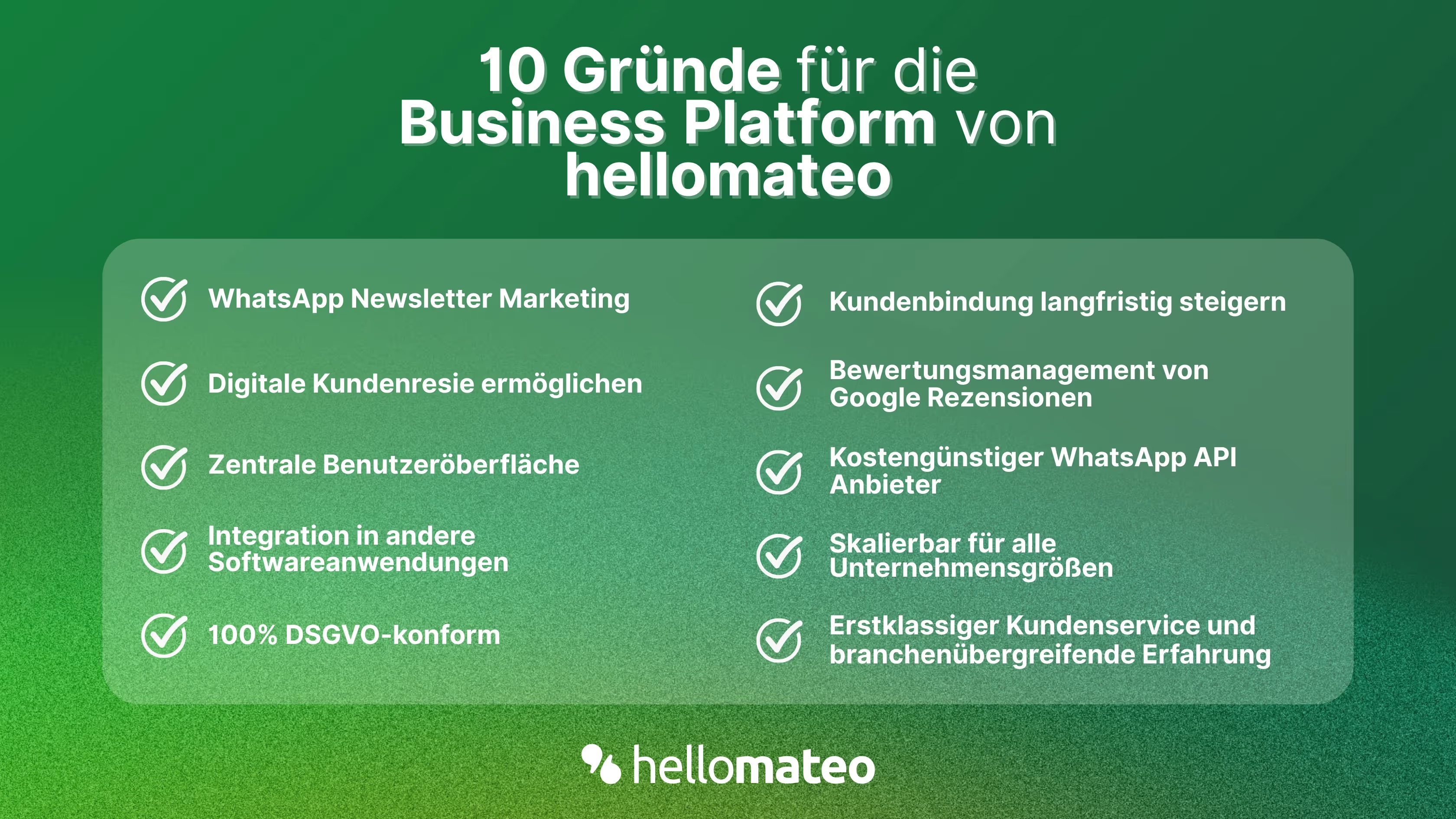
- Zentrale Benutzeroberfläche: hellomateo vereint WhatsApp Business Platform, E-Mail, Instagram, SMS und Facebook Messenger in einem zentralen Posteingang. Die intuitive Benutzeroberfläche beinhaltet diverse Tools für effiziente Kundenkommunikation und spart Ihnen wertvolle Arbeitszeit.
- Integrationen: Mit hellomateo können Sie WhatsApp in über 6.000 Softwareprogramme integrieren und vollautomatisierte Kundenreisen mit Einladungen, Bestellbestätigungen, Versandinformationen, Rechnungen und Erinnerungen erstellen.
- Newsletter Marketing: Versenden Sie DSGVO-konforme Newsletter über WhatsApp oder SMS und profitieren Sie von Öffnungsraten über 95 %.
- Bewertungsmanagement: hellomateo kann automatisiert Online-Bewertungen von Ihren Kunden anfordern, was Ihr Google-Ranking und das Vertrauen in Ihr Unternehmen stärkt.
- Datenschutz: hellomateo erfüllt alle deutschen und europäischen Datenschutzanforderungen und bietet Ende-zu-Ende Verschlüsselung für sichere Kundenkommunikation.
- Skalierbarkeit: Unsere Software eignet sich für Unternehmen jeder Größe und lässt sich je nach Paket unbegrenzt erweitern.
- Diverse AI features: Our AI agent can automatically answer customer inquiries in chat, answer calls, help with the formulation of messages and much more.
Arrange a non-binding and free consultation and we'll show you how hellomateo covers your communication needs! Simply book an appointment here or write to us via our web widget.

About the author
Domenik Fox
CEO and Co-Founder
Domenik Fox is co-founder and CEO of hellomateo. He is responsible for Customer Success, Customer Engineering, Finance and Product. A particular focus of his work is on the continuous development of the product and the design of new features. In terms of content, he focuses primarily on automated and personalized customer communication, multichannel marketing and digital customer journeys. Together with Christian Strauch and Philipp Steinrötter, he is continuously developing hellomateo into a central platform for modern customer experience in SMEs.
More interesting articles
WhatsApp Business Data Processing Agreement— all information for companies
WhatsApp is an integral part of customer communication for many companies. High opening rates and quick responses make the channel attractive. But as soon as you use WhatsApp Business, you process personal data — and therefore there are clear GDPR requirements. In this article, you will find out what role the order processing contract plays and why it is indispensable for companies.

![Set up WhatsApp Business Auto Reply — Quick Guide [2025]](https://cdn.prod.website-files.com/68b19e5233a4641b9e2e4f95/692dd05228900f9fa9834bd4_whatsapp-automatische-antwort.avif)
Set up WhatsApp Business Auto Reply — Quick Guide [2025]
With automatic Reply messages Is there for them in the WhatsApp Business App provides a practical way to your customers in the digital chat channel automatically greet And in a flash one first reaction to show. Because day-to-day business is often stressful; you can't always respond personally to incoming messages and write back to the customer immediately.
But there are also many other reasons why it makes sense to use automatic reply messages when using the WhatsApp Business app. With this Quick guide Automatic answers are set up in a flash!

![Grüner Haken in WhatsApp – So bekommen Unternehmen die Verifizierung [Oktober 2025]](https://cdn.prod.website-files.com/68b19e5233a4641b9e2e4f95/692dcf56fb67605603b34297_gruener-haken.avif)
Grüner Haken in WhatsApp – So bekommen Unternehmen die Verifizierung [Oktober 2025]
WhatsApp hat eine neue Funktion eingeführt: Unternehmen können Ihr Konto verifizieren lassen und bei erfolgreicher Legitimation einen grünen Haken in dem WhatsApp Business Unternehmensprofil erhalten. Das sorgt für mehr Vertrauen bei Kaufinteressenten Ihres Unternehmens und steigert Ihre Umsätze! Zudem können Sie sich durch einen grünen Haken in WhatsApp Business von Ihren Wettbewerbern abheben. Doch wie funktioniert die Beantragung des beliebten Symbols? In diesem Beitrag zeigen wir es Ihnen!