How do you get access to the WhatsApp Business API? [July 2024]
Veröffentlicht am
12.07.2024
Arrange a non-binding consultation now
Im unverbindlichen Gespräch zeigen wir Ihnen, wie Sie Kunden per WhatsApp zu Terminen einladen und Anfragen gemeinsam im Team beantworten. Zusammen schauen wir, welche Abläufe sich in Ihrem Betrieb sinnvoll automatisieren lassen.


What are the requirements for setting up and using the WhatsApp Business API?
The WhatsApp Business API is a powerful tool for optimizing companies' communication processes. However, there are certain requirements that companies must meet before they can use the API interface. Since direct access to the WhatsApp Business API is only reserved for a very small number of large international corporations, the path to the API for most companies is via a so-called Business Solution Provider (BSP). The WhatsApp API provider of your choice may have additional requirements for your company. As a rule, the requirements listed here must always be met:
1.: Telephone number
To set up and use the WhatsApp Business API, you need a mobile number or a Landline number. If you do not yet have a number for this purpose or need several additional numbers and would like to use the WhatsApp Business API with hellomateo, we will of course support you with this.
2.: Accept and comply with the terms of use and terms and conditions
Since WhatsApp is part of the Meta group of companies, all companies that use WhatsApp Business must WhatsApp Commerce Policy comply. According to the trade policy, the following are industries and services from the use of all WhatsApp business products precluded:
- Alcohol, tobacco products and accessories
- Drugs and medicines
- Illegal products and services
- Unsafe dietary supplements
- Weapons, ammunition, or explosives
- and much more
Accordingly, companies must check in advanceWhether it's according to the Trading Policy are entitled to use WhatsApp Business or WhatsApp Business API and whether they use the messenger Terms of usebe able to comply. Otherwise, there is a risk of blocking the WhatsApp profile.
3.: Basic technical understanding
Depending on which WhatsApp API provider you choose, a comprehensive technical understanding may be required. How complex Setting up and using the WhatsApp API depends on Set-up process and the software interface your API provider off. At hellomateo, you will be guided through the setup process in a personal setup meeting with one of our messaging experts. If you have any problems while setting up or using the WhatsApp API and if you have any questions, our team will be happy to help you immediately.
By meeting these requirements, you lay the foundation for a successful and seamless setup of the WhatsApp Business API.
How does setting up the WhatsApp Business API work?
Setting up the WhatsApp Business API is a multi-step process, which can differ in details depending on the respective WhatsApp API provider. The higher-level steps are always the same regardless of your chosen WhatsApp API provider:
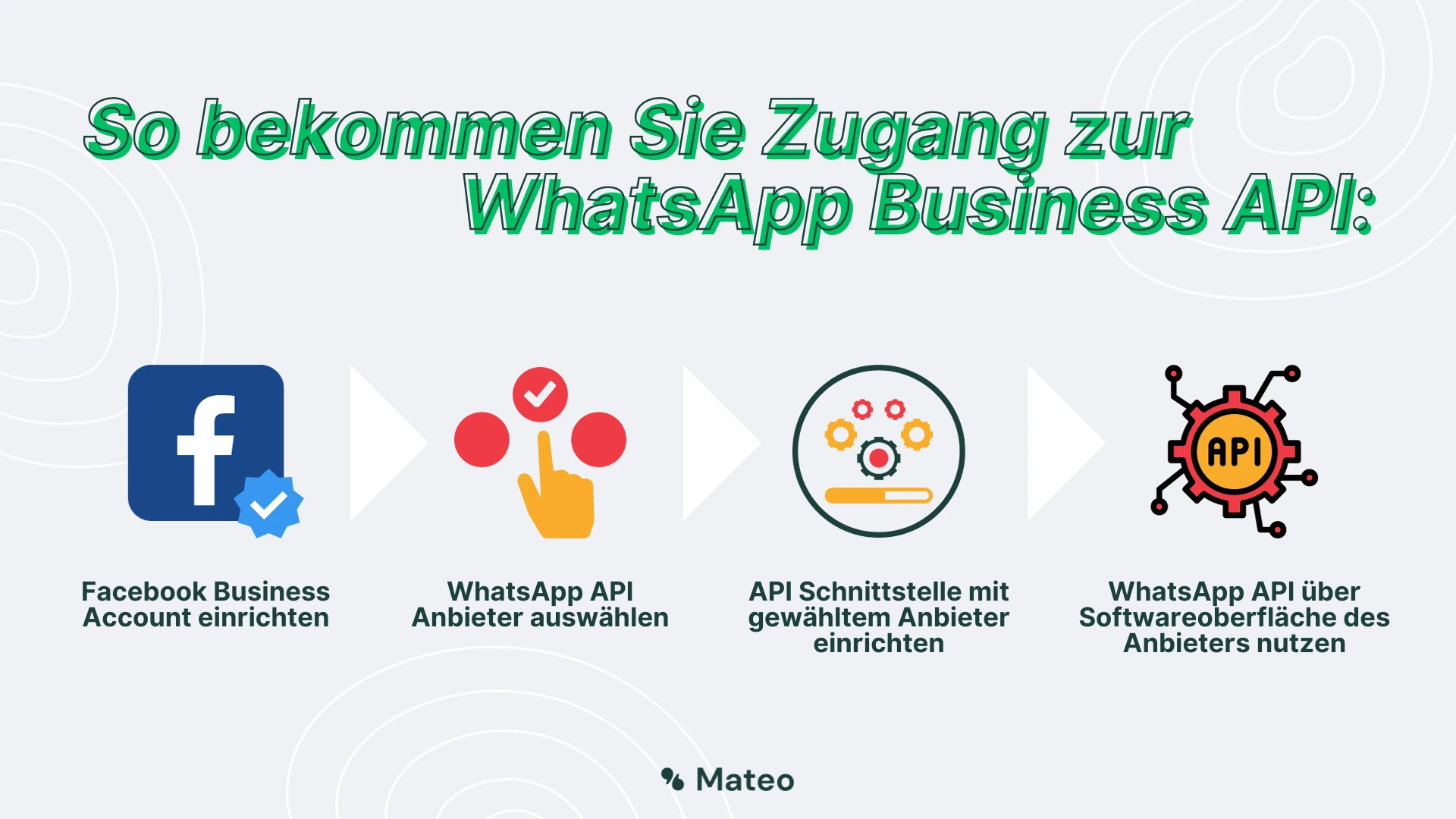
1.: Set up a Facebook Business account
Since WhatsApp is part of Meta, a Facebook Business account is required to Application process toward commencing. Make sure that your company profile is complete and up to date. If you want to use all the features of the WhatsApp Business API, you should use your Facebook Business account verifying leave. We strongly recommend verification for all our customers.
2.: Choosing a WhatsApp API provider
WhatsApp works with a range of Business solution providers together, which integrate the API and provide a software interface. dialling You a vendors, which meets your requirements, offers a good price/quality ratio, covers the required range of functions and supports the process. If you are interested in WhatsApp business API solution from hellomateo Do you have, are you welcome to have one free consultation agree.
Alternatively: Die independent facility Without a WhatsApp API provider is also possible, but requires a powerful IT department and A great deal of time, since the entire Self-programmed user interface must be. In this case, it would be WhatsApp Cloud API recommended, as this at least makes the server infrastructure less complex.
3.: Set up an API interface with the selected provider
If you are a professional WhatsApp API provider with a comprehensive customer service have selected, you will be supported in this sometimes demanding step by your API provider and by Set-up process guided. Otherwise, it may take some time and effort. At hellomateo, the setup is carried out by one of our messaging experts, who personally takes time for you. Die complex technical connection to the API, such as the server configuration and the establishment of webhooks, is done for you by our team.
4.: Use WhatsApp API via the provider's software interface
If the previous steps have been completed successfully, everything should be done for the utilization Be ready for the WhatsApp Business API interface. that Sending and receiving messages Is carried out via software interface your WhatsApp API provider. Meta itself does not have a software interface for the WhatsApp API.
Reading tip: How much does messaging via the WhatsApp Business API actually cost? In this article, you can find out the current prices of the WhatsApp API!
Differences between WhatsApp Business and WhatsApp API
To keep track of the two variants of WhatsApp, all important information is summarized in the following table.
| Funktion | WhatsApp Business | WhatsApp Business API mit hellomateo |
|---|---|---|
| Versenden von Text-, Bild-, Sprachnachrichten & Dateien | Ja | Ja |
| Detailliertes Unternehmensprofil mit Produktkatalog | Ja | Ja |
| Diverse Tools (Textbausteine, automatische Antworten, Chatskategorisierung) | Ja | Ja |
| Chats löschen, archivieren, stummschalten oder anpinnen | Ja | Ja |
| Integration von Softwareanwendungen inkl. automatisiertem Nachrichtenversand | Nein | Ja |
| WhatsApp-Newsletter | Nein | Ja |
| Tiefgreifende Statistiken | Nein | Ja |
| DSGVO-Konform | Nein | Ja |
| Mehrere Nutzer pro Account | Nein | Ja |
| Mehrere Geräte pro Account | Ja, bis zu 5 Desktop-PCs | Ja, unbegrenzt viele Smartphones & PCs |
| Selbstständige Einrichtung | Ja | Nein, Einrichtung über hellomateo |
| iOS, Android und Web-Anwendung | Ja | Ja |
| Kostenlose Verwendung | Ja | Nein, kostenpflichtig |
What are the benefits of WhatsApp Business API in conjunction with hellomateo?
hellomateo's messaging software offers much more than a simple WhatsApp API user interface. Various features and tools mean that hellomateo's central messaging software makes customer communication significantly more efficient. Just arrange a free consultationto find out all the details Our customers know the following benefits particularly appreciated:
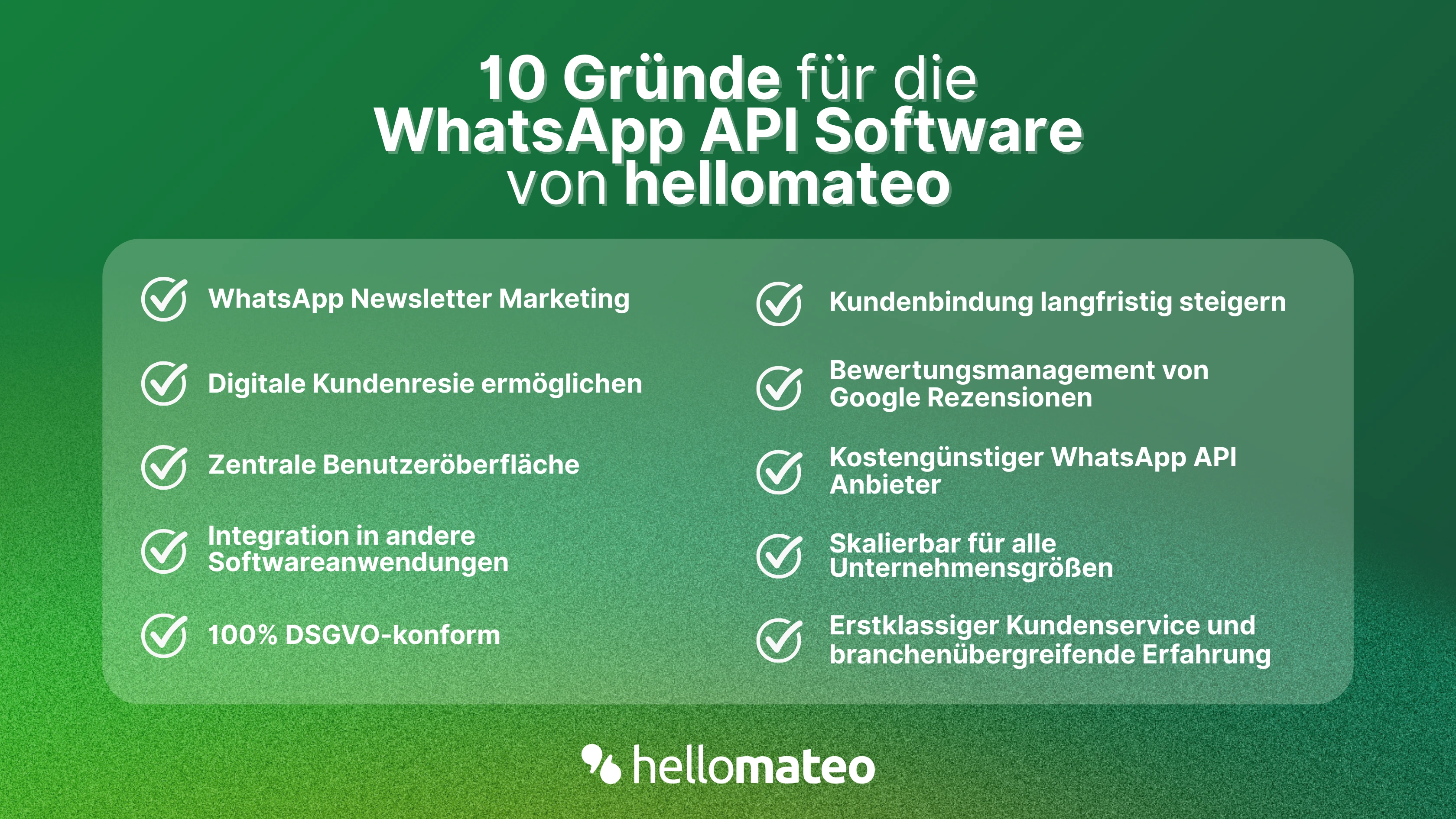
- Central user interface: hellomateo combines WhatsApp Business Platform, email, Instagram, SMS and Facebook Messenger in one central inbox. The intuitive user interface includes various tools for efficient customer communication and saves you valuable working time.
- integrations: With hellomateo, you can use WhatsApp in integrate over 6,000 software programs and fully automated Customer trips create with invitations, order confirmations, shipping information, invoices, and reminders.
- Newsletter marketing: Send GDPR-compliant Newsletter via WhatsApp or SMS and benefit from opening rates of over 90%.
- Assessment management: hellomateo can Automatically request online reviews from your customers, which boosts your Google ranking and trust in your company.
- Data protection: hellomateo meets all German and European Data protection requirements and offers end-to-end encryption for secure customer communication.
- scalability: Our software is suitable for Businesses of all sizes and can be extended indefinitely depending on the package.
- Diverse AI features: Our AI agent can automatically answer customer inquiries in chat, answer calls, help with the formulation of messages and much more.
Arrange a non-binding and free consultation and we'll show you how hellomateo covers your communication needs! Simply book an appointment here or write to us via our web widget.