How can you delete negative Google reviews? [July 2025]
04.07.2025
Arrange a non-binding consultation now
In a non-binding conversation, we'll show you how to use messenger communication in compliance with GDPR, automate processes and achieve measurably more revenue and efficiency with WhatsApp. Clear, practical and tailored to your company.


Can negative Google reviews even be deleted?
The good news first: Yes! Under certain circumstances, it is possibleto have a negative customer review deleted by Google. As a Google customer, you have the option to use the Report the content of a review and to request deletion. The requirements for this and how to delete a negative Google review are explained in the following sections.
What are the requirements for removing negative reviews?
The deletion of negative Google reviews subject to some criteria. In this way, Google wants to avoid categorically deleting negative feedback and thus distorting companies' reviews.
But which negative reviews can you delete now and which not? In principle, the following applies: Does a negative review violate applicable law, you are entitled to have it removed. The same applies if a negative review against Google guidelines violates.
However, if a review does not violate Google guidelines or applicable law, then you also have no wayto remove this review. In such cases, you should refer to the ones we summarize below “Best Practices” Stop Google reviews to deal with negative reviews.
An overview of Google's review guidelines can be found at this link.
Instructions for the various options for deleting negative Google reviews
There are multiple ways to delete negative Google reviews. Either via Google directly, via a form, via the Google My Business profile or via Google Maps. To do this, follow these steps:
Option 1: Request deletion of the review directly from Google
You can request the deletion of a review either in Google Maps, in your Google My Business profile, or via the form provided by Google. The application and deletion in this way are free of charge for you, but may take some time. In individual cases, the processing time can be several weeks and depends on Google.
Option 2: Request deletion via Google Form
The form can be found via this link. Fill out the form with your information and provide the URL of the review that you want to delete due to infringing content. Once submitted, the process will be processed by Google. Here, too, it can be very fast or take several weeks. It is difficult to assess in advance how quickly the issue will be dealt with.
Option 3: Request deletion via your Google My Business profile
- Open your Google My Business profile and select the company and, if applicable, the correct location.
- Under “Reviews,” find the review that you would like to delete.
- You can use the “three dot icon” and “report as inappropriate” to request that the review be deleted.
- Google will now process the process and you will receive feedback as to whether the review has been deleted.
Option 4: Remove negative reviews via Google Maps
- Open Google Maps on your phone.
- Find your business and the review you'd like to delete.
- Here, select the “three dot icon” and “report as inappropriate.” You have now requested that the review be deleted.
- Google will now process the process and you will receive feedback as to whether the review has been deleted.
Last resort: Request that a lawyer remove bad reviews
If Google hasn't responded to your request to delete a review, or you've received feedback that the review won't be deleted, there is one last way to implement a successful deletion: Engaging a lawyer.
Note: Before you hire an attorney to delete your case, make sure once again that the review actually violates guidelines or applicable law.
Lawyers with a focus on Internet law are the right partner for you when it comes to successfully deleting a review from Google. After an initial consultation, the latter usually draws up a lawyer's letter, which should clarify their legal claim against Google.
You should note that a lawyer is of course associated with costs. These are usually around 150 euros for writing a lawyer's letter.
Reading tip: In these articles, you will find all important information for Buy from Google reviews and for that correct answers to negative reviews.
The right way to deal with negative reviews
Even though negative reviews can be unpleasant, should you still be unpleasant to them Pay attention. They often contain important feedback or information that can help you become even better and in the future Mistakes to avoid. By dealing with negative reviews, you can also show potential customers how to Respond to problems and criticism And which Service As a customer, you can expect. Below you will find 2 Best PracticesHow you should deal with negative Google reviews.
Tip 1: Respond to your customers
Respond to negative reviews from your customers. Thank you for the feedback, apologize for possible mistakes, or suggest a solution to the customer should they have a specific problem. This also shows other customers who read the review that you take critical feedback to heart and are always striving to find a solution. If you're really annoyed by a review, it may also make sense to do something else first or let some time pass before you respond to the review. This prevents frustration-laden answers that may only further annoy the customer.
Tip 2: Use customer feedback
All feedback is important, because only through honest customer feedback can you improve as a company. Therefore, take a close look at what your customers have to say in negative reviews, try to empathize with their situation and try to understand why customers feel irritated. In this way, you gain valuable insights into processes that are not yet 100% satisfied with your customers at the moment and can improve them based on this.
Better Google reviews with hellomateo's rating management
Even if you manage to delete bad reviews under certain circumstances, more positive reviews are still the best answer to individual negative reviews. With hellomateo, you collect an average of 2-3 times as many positive Google reviews. How does that work? you Automatically send targeted review requests via WhatsApp to satisfied customers. The more reviews you have, the better you'll be found on Google, for example. Reviews also build trust in your company.
Other benefits of hellomateo: customer loyalty, marketing and automation
With hellomateo and the WhatsApp Business Platform companies can inspire their customers with customer communication and marketing, maximize their sales and minimize internal workload. integrations with thousands of other software applications, WhatsApp newsletter marketing, unlimited scalability and flexibility, automatic responses, GDPR compliance, etc. — the WhatsApp Business Platform has so much to offer. Just arrange a free consultationto find out all the details Our customers know the following benefits particularly appreciated:
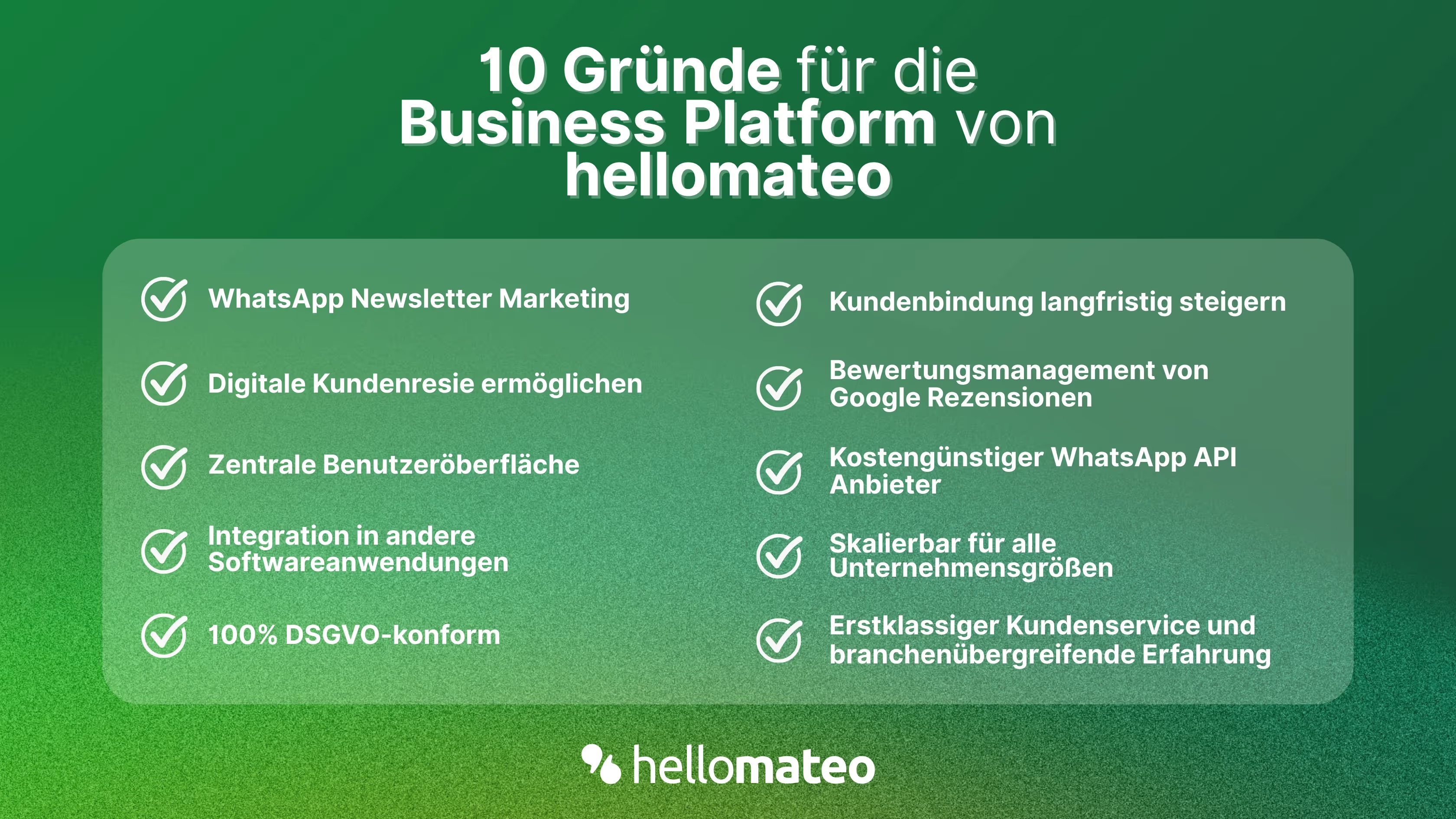
- Central user interface: hellomateo combines WhatsApp Business Platform, email, Instagram, SMS and Facebook Messenger in one central inbox. The intuitive user interface includes various tools for efficient customer communication and saves you valuable working time.
- integrations: With hellomateo, you can use WhatsApp in integrate over 6,000 software programs and fully automated Customer trips create with invitations, order confirmations, shipping information, invoices, and reminders.
- Newsletter marketing: Send GDPR-compliant Newsletter via WhatsApp or SMS and benefit from opening rates of over 95%.
- Assessment management: hellomateo can Automatically request online reviews from your customers, which boosts your Google ranking and trust in your company.
- Data protection: hellomateo meets all German and European Data protection requirements and offers end-to-end encryption for secure customer communication.
- scalability: Our software is suitable for Businesses of all sizes and can be extended indefinitely depending on the package.
- Diverse AI features: Our AI agent can automatically answer customer inquiries in chat, answer calls, help with the formulation of messages and much more.
Arrange a non-binding and free consultation and we'll show you how hellomateo covers your communication needs! Simply book an appointment here or write to us via our web widget.
About the author
Henri Hoepfner
SEO marketer
Henri Hoepfner ist bei hellomateo für Website und Content zuständig. Der studierte Wirtschaftsingenieur ist Mitarbeiter der ersten Stunde und kann dank seiner langjährigen Erfahrung wertvolles Wissen über verschiedene Themen wie WhatsApp API, Marketing, Kundenbindung und auch über branchenspezifische Problemstellungen in seinen Blogbeiträgen teilen.
More interesting articles
WhatsApp Business Data Processing Agreement— all information for companies
WhatsApp is an integral part of customer communication for many companies. High opening rates and quick responses make the channel attractive. But as soon as you use WhatsApp Business, you process personal data — and therefore there are clear GDPR requirements. In this article, you will find out what role the order processing contract plays and why it is indispensable for companies.

![Set up WhatsApp Business Auto Reply — Quick Guide [2025]](https://cdn.prod.website-files.com/68b19e5233a4641b9e2e4f95/692dd05228900f9fa9834bd4_whatsapp-automatische-antwort.avif)
Set up WhatsApp Business Auto Reply — Quick Guide [2025]
With automatic Reply messages Is there for them in the WhatsApp Business App provides a practical way to your customers in the digital chat channel automatically greet And in a flash one first reaction to show. Because day-to-day business is often stressful; you can't always respond personally to incoming messages and write back to the customer immediately.
But there are also many other reasons why it makes sense to use automatic reply messages when using the WhatsApp Business app. With this Quick guide Automatic answers are set up in a flash!
![Grüner Haken in WhatsApp – So bekommen Unternehmen die Verifizierung [Oktober 2025]](https://cdn.prod.website-files.com/68b19e5233a4641b9e2e4f95/692dcf56fb67605603b34297_gruener-haken.avif)
Grüner Haken in WhatsApp – So bekommen Unternehmen die Verifizierung [Oktober 2025]
WhatsApp hat eine neue Funktion eingeführt: Unternehmen können Ihr Konto verifizieren lassen und bei erfolgreicher Legitimation einen grünen Haken in dem WhatsApp Business Unternehmensprofil erhalten. Das sorgt für mehr Vertrauen bei Kaufinteressenten Ihres Unternehmens und steigert Ihre Umsätze! Zudem können Sie sich durch einen grünen Haken in WhatsApp Business von Ihren Wettbewerbern abheben. Doch wie funktioniert die Beantragung des beliebten Symbols? In diesem Beitrag zeigen wir es Ihnen!