Optimize Google My Business Profile - Instructions & Tips
24.07.2022
Arrange a non-binding consultation now
In a non-binding conversation, we'll show you how to use messenger communication in compliance with GDPR, automate processes and achieve measurably more revenue and efficiency with WhatsApp. Clear, practical and tailored to your company.


Google is number one in the world when it comes to search engines. Google answers well over 200 billion search queries per hour. Many things are searched for by users using the Google search engine — information about products, companies or other services.
Most people use Google when they want to find a specific piece of information, a specific product, or a brand. The Google My Business profile plays an important and decisive role in Google's search results. In fact, in this Google My Business profile, users can find the most important information about a company. Please read our article about”Google My Business Account: The most important information at a glance“to find out more about it.
Why is a Google My Business profile even important?
The range of search entries that run on Google is virtually limitless. The search on Google is used by a mass of people every day to obtain information about various things. Whether it's the latest news, a nearby coffee, a doctor's office or the latest trends in technology, everything is searched for via Google. The entry in Google My Business makes your company visible and noticeable to consumers who are specifically looking for a product or brand. It is therefore worthwhile to enter a Google My Business profile Definitely. Such an entry is easy for any company to implement.
Since Google has a very large user group, it is very likely that your company's target audience also uses Google as a search engine. A Google listing that is optimized accordingly and contains all important information benefits local companies in particular.
An overview of the benefits of a Google My Business account
- Possibility for your customers to leave a Google review
- You get information from Google My Business about your target group
- Your company's appearance on Google Maps
- Free Google My Business listing
- Has positive effects on SEO performance
How to optimize your Google My Business business profile
Do you still not have a Google My Business entry for your company? If so, you should take advantage of this option and create one.
If there is already an entry for your company, then it is worth checking it out; it may be possible that your listing can be improved even further. A properly optimized Google My Business profile contains some important information about you for your customers: The name of your company, the industry, contact details, your opening hours, reviews and much more.
important! A completed Google My Business profile
Your Google business profile should be complete as it goes a long way towards achieving results in local search results. A Google listing that is complete serves customers as an overview of your company or the products you offer. This increases the chance that customers will visit your website or shop.
General information that should be entered in your Google My Business profile:
- Has positive effects on SEO performance
- address
- phone number
- Internet site
- Opening hours
In addition, specific data can also be entered. For example what type of company it is and what exactly you offer, product or service. It is also possible to store customer questions that occur frequently as FAQs. Certain promotions, such as Valentine's Day offers, can also be added to let your customers know.
Proper provision of contact details
The Google My Business entry is roughly equivalent to a digital business card. Information such as website, address, telephone number and e-mail is immediately available to the user.
It is important that your company name is spelled correctly and is used exactly as it appears on your website or in your shop. You should avoid adding relevant keywords to your company name, as this could result in you getting fined. The correct spelling of the address should be consistent everywhere and free from errors.
Selecting appropriate categories and attributes
If you pay attention to a few points, you can provide your target group with additional features and useful information. It is important to specify the right category for your company and also the appropriate characteristics. For a restaurant, for example, you could add a menu or reserve tables.
Google has a wide selection of categories, so you can certainly choose a suitable one for your company. The more significant, the better for your company.
Once you have decided on a category, you should select the appropriate special features. These should suit your company and reflect it exactly. These special qualities should represent your company well. Certain features, such as “barrier-free” or “free Wi-Fi”, are, for example, attributes that should be mentioned.
Adding a business description
The Google listing becomes more interesting with a concise description of your company. This should be directly under the name of the company. Please note that it cannot be freely edited. However, the text, which is under the heading “From the company”, can be freely edited, amended and adapted.
Up to 750 characters are allowed for this text and you can phrase it as you like. You should make sure that you adapt this text to the target group and write it in such a way that the important information about your company is right at the beginning. This description is intended to set yourself apart from competitors.
Adding company photos
Photos also play a decisive role in a Google My Business listing. This allows you to show your potential customers what your company, service, products, or business looks like. It is also possible to exchange ideas with interested parties and share photos via your Google listing. This gives people who are interested in your company the opportunity to get a first and better impression of your company. This promotes building trust and stimulates interest.
It is possible that every user can add photos to your listing in Google Business. However, it is better if you yourself ensure that high-quality images appear in your Google My Business listing. This ensures that the content is meaningful.
Acquiring new Google reviews
Potential customers often look at reviews of a company and believe what is written in them. Regardless of whether it concerns restaurants, retail stores or healthcare professionals. For potential customers, it is of great importance what is in the reviews from other customers. Authentic, honest and genuine reviews are therefore an important tool for an appealing Google My Business listing.
It is also important that you, as a company, also on Respond to incoming reviews. An understanding response and thanking you for the review are always appropriate, regardless of whether the review was good or bad.
With hellomateo, you can use the full potential of your Google My Business entry
With hellomateo, you can bundle all communication channels in one platform. Hellomateo offers a universal inbox that combines all of your customer communication. Whether it's Instagram, WhatsApp, Facebook or your email — everything centrally in an inbox.
That too Managing your Google reviews is possible with hellomateo. You can easily send review links via the customer's preferred channel. You receive an automatic notification of incoming new reviews and can therefore respond more specifically and immediately to customer feedback.
Would you like to use hellomateo? Or do you have any questions about our product? We are happy to offer you a free consultation to show you how to retain and reactivate more existing customers and attract new customers with hellomateo. To do this, simply book an appointment or contact us via our web widget.
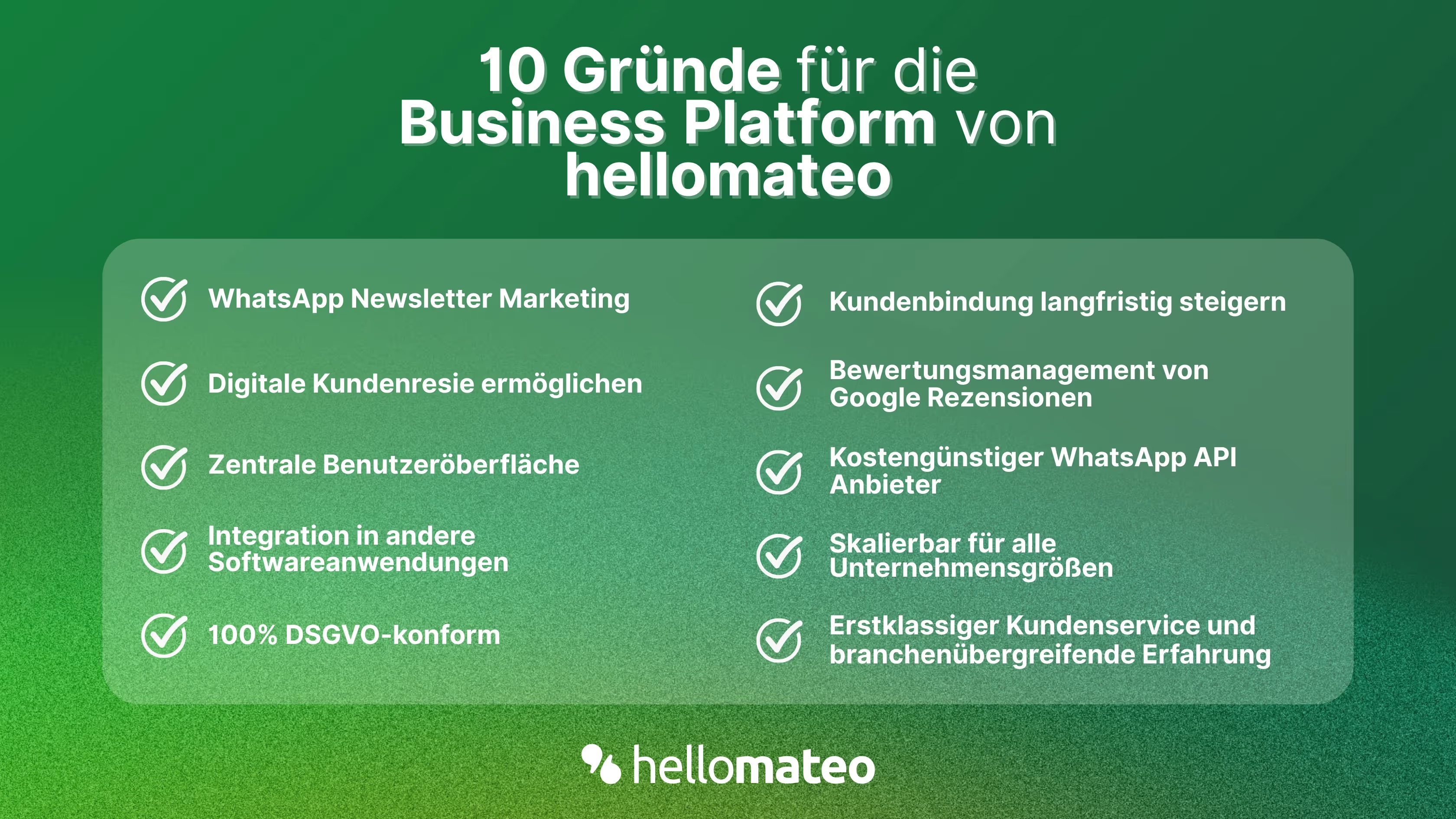
- Central user interface: hellomateo combines WhatsApp Business Platform, email, Instagram, SMS and Facebook Messenger in one central inbox. The intuitive user interface includes various tools for efficient customer communication and saves you valuable working time.
- integrations: With hellomateo, you can use WhatsApp in integrate over 6,000 software programs and fully automated Customer trips create with invitations, order confirmations, shipping information, invoices, and reminders.
- Newsletter marketing: Send GDPR-compliant Newsletter via WhatsApp or SMS and benefit from opening rates of over 95%.
- Assessment management: hellomateo can Automatically request online reviews from your customers, which boosts your Google ranking and trust in your company.
- Data protection: hellomateo meets all German and European Data protection requirements and offers end-to-end encryption for secure customer communication.
- scalability: Our software is suitable for Businesses of all sizes and can be extended indefinitely depending on the package.
- Diverse AI features: Our AI agent can automatically answer customer inquiries in chat, answer calls, help with the formulation of messages and much more.

Interested? Book a free, non-binding demo appointment and learn more about hellomateo and WhatsApp communication. Book here.
About the author
Henri Hoepfner
SEO marketer
Henri Hoepfner ist bei hellomateo für Website und Content zuständig. Der studierte Wirtschaftsingenieur ist Mitarbeiter der ersten Stunde und kann dank seiner langjährigen Erfahrung wertvolles Wissen über verschiedene Themen wie WhatsApp API, Marketing, Kundenbindung und auch über branchenspezifische Problemstellungen in seinen Blogbeiträgen teilen.
More interesting articles
WhatsApp Business Data Processing Agreement— all information for companies
WhatsApp is an integral part of customer communication for many companies. High opening rates and quick responses make the channel attractive. But as soon as you use WhatsApp Business, you process personal data — and therefore there are clear GDPR requirements. In this article, you will find out what role the order processing contract plays and why it is indispensable for companies.

![Set up WhatsApp Business Auto Reply — Quick Guide [2025]](https://cdn.prod.website-files.com/68b19e5233a4641b9e2e4f95/692dd05228900f9fa9834bd4_whatsapp-automatische-antwort.avif)
Set up WhatsApp Business Auto Reply — Quick Guide [2025]
With automatic Reply messages Is there for them in the WhatsApp Business App provides a practical way to your customers in the digital chat channel automatically greet And in a flash one first reaction to show. Because day-to-day business is often stressful; you can't always respond personally to incoming messages and write back to the customer immediately.
But there are also many other reasons why it makes sense to use automatic reply messages when using the WhatsApp Business app. With this Quick guide Automatic answers are set up in a flash!
![Grüner Haken in WhatsApp – So bekommen Unternehmen die Verifizierung [Oktober 2025]](https://cdn.prod.website-files.com/68b19e5233a4641b9e2e4f95/692dcf56fb67605603b34297_gruener-haken.avif)
Grüner Haken in WhatsApp – So bekommen Unternehmen die Verifizierung [Oktober 2025]
WhatsApp hat eine neue Funktion eingeführt: Unternehmen können Ihr Konto verifizieren lassen und bei erfolgreicher Legitimation einen grünen Haken in dem WhatsApp Business Unternehmensprofil erhalten. Das sorgt für mehr Vertrauen bei Kaufinteressenten Ihres Unternehmens und steigert Ihre Umsätze! Zudem können Sie sich durch einen grünen Haken in WhatsApp Business von Ihren Wettbewerbern abheben. Doch wie funktioniert die Beantragung des beliebten Symbols? In diesem Beitrag zeigen wir es Ihnen!